
Ideas, in three dimensions.
Describe a fantasy, sci-fi, or anime-style character and watch it become a 3D model you can print. No CAD, no sculpting.
No account needed · Free guest generations · STL export
01 / In action
From a sentence to a printable model
Watch a real generation, then see the result in the studio on desktop and on your phone.
01
Describe it
Type what you want — here “Create a Poolparty Viking” — and set the size it has to fit.
02
Watch it generate
Thunder Bot analyzes the prompt, creates a reference image, then builds the mesh. Every stage is visible.
03
Refine & export
Set exact dimensions, add a print base, sculpt details and inspect the mesh — then download a print-ready STL.
04
Take it anywhere
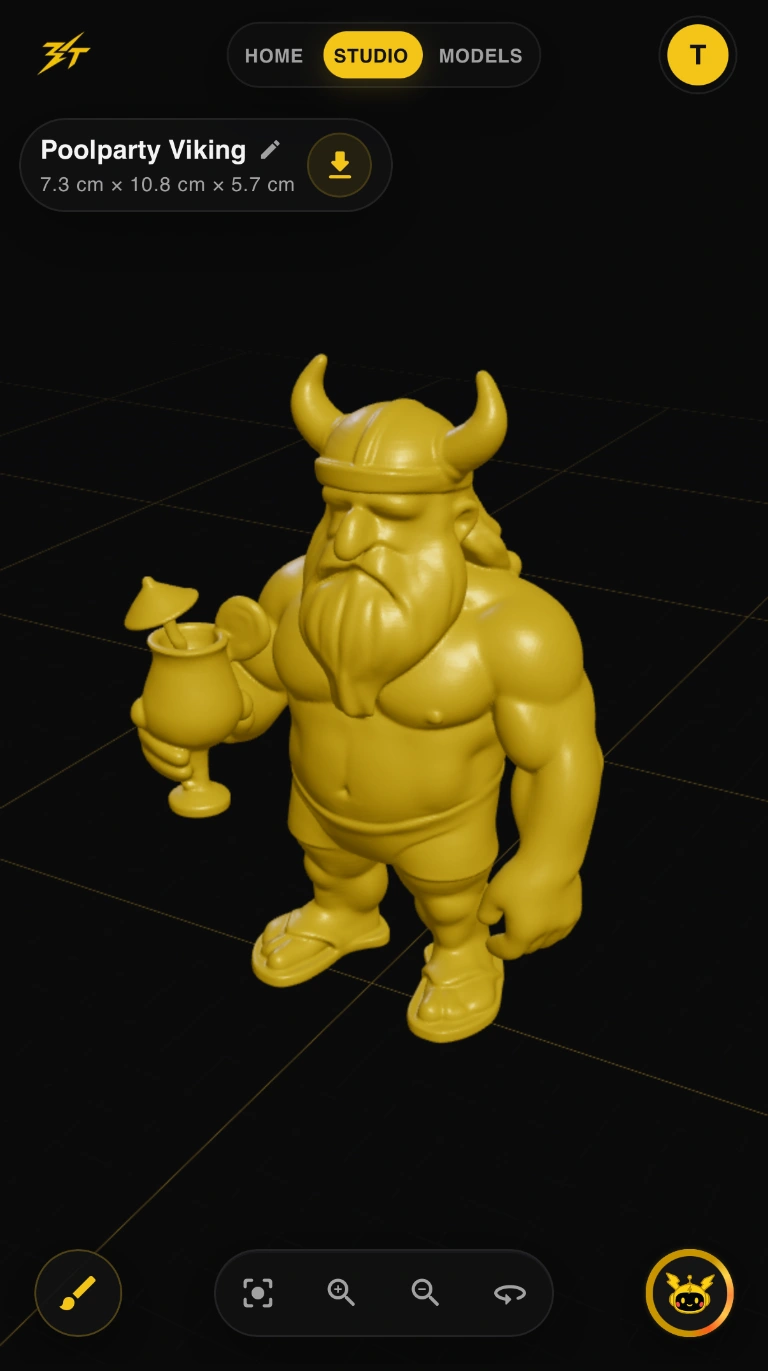
The same studio on your phone: rotate, zoom, and download from the couch.
03 · REFINE & EXPORT
A real studio, right in the browser
Set exact dimensions
04 · ON YOUR PHONE
Same studio, pocket size
02 / Gallery
Made with Thunder Bot
Real models from the community. Open one to rotate and zoom it yourself.
02 / What you can make
3D printable miniatures, figures & characters
Whatever genre you're into, describe your own original character and export an STL. 3D Thunder is an independent project and isn't affiliated with any game, anime, or entertainment brand.
01
Tabletop & wargaming miniatures
Heroes, monsters, and squad leaders for tabletop RPGs and wargames. Set the height to match your scale and print at 28 mm, 32 mm, or larger.
02
Sci-fi armored soldiers
Heavily armored space-marine-style troopers, mechs, and aliens — describe the armor, weapons, and pose to build your own original sci-fi army.
03
Anime-style & chibi figures
Big-eyed chibi characters, anime-inspired heroes, and pirate-adventure crews as original collectible figurines for your shelf.
04
Fantasy creatures & dragons
Dragons, knights, wizards, goblins, and gecko samurai — organic, figurative models that suit resin and FDM printers.
05
Cosplay props & collectibles
Small accessories, desk figures, and display pieces for conventions, collections, and custom action-figure projects.
06
Personalized 3D printed gifts
A pet, a mascot, or an inside joke turned into a one-of-a-kind printed figurine.
03 / Capabilities
One page, prompt to print file
Everything that matters between an idea and a printable file, without installing anything.
Text-to-3D generation
Describe what you want in plain language. Thunder Bot interprets it and builds a mesh. Results still vary by prompt; that's part of the experiment.
Your exact dimensions
Set a maximum width, height, and depth so every model fits the print volume you actually have.
Surface editing
Refine and smooth details on the interactive canvas before you commit to a print.
Chat-style edits
Ask for a longer tail or a smaller helmet and iterate on the same model instead of starting over.
Personal collection
Save every model to your own library and come back to it any time.
STL export
One click exports a print-ready STL for your own printer or a print service.

Fast as lightning. Simple by design.
I'm Enes K. This started as a question, not a business plan: how far can current AI actually get at turning a plain description into an organic, figurative mesh — something you could hold and print, not just render?
That is the name: 3D for the form, Thunder for the speed.
Go ahead, try to break it.
Still rough around the edges — results depend a lot on the prompt and style you pick. Guests get a few free generations, no account required.
Try a generationYour idea could be next.
Share an idea, a problem, or a privacy request directly with Enes K.